
One inbox for every way your clients reach you.
Switchboard brings your messages into one place, with the client's booking details sitting right beside each conversation, so nothing slips between apps.
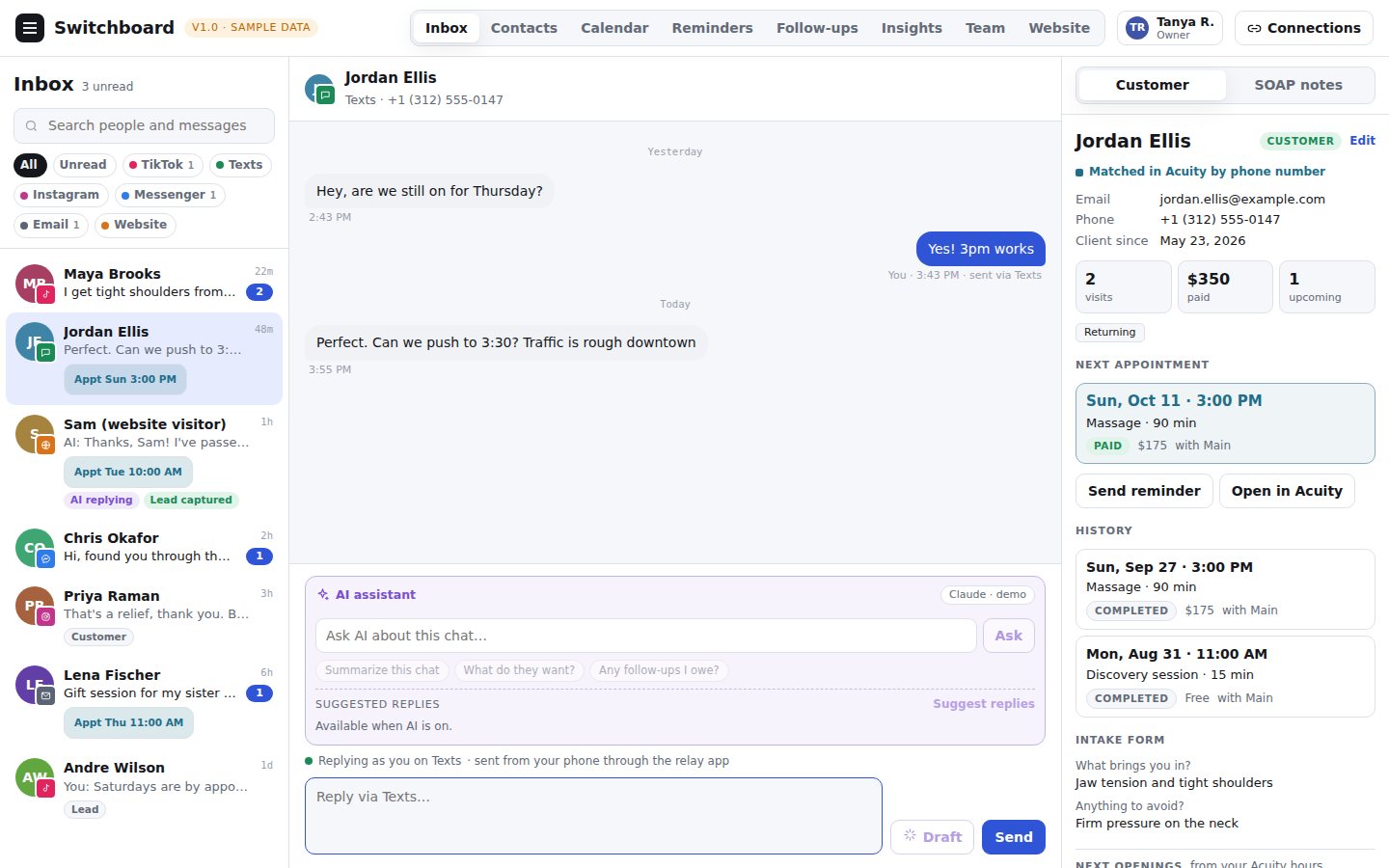
Sample data. The practice and clients shown are fictional.
Built for the way a small practice works
The person who treats clients is usually the person answering messages too. Switchboard is made for that.
Reply from one place
Website chat, email and, as each platform approves access, TikTok, Messenger and Instagram all arrive in a single inbox.
Booking beside the chat
Appointments, open times and client history from Acuity Scheduling sit next to the conversation, so the answer is already on screen.
Reminders that run themselves
Appointment reminders and gentle follow-ups go out under rules you set, and follow-ups stop on their own if the client replies.
How it works
We set it up for you. There is nothing to install and no new place for your clients to go.
We connect your channels
Your website, your booking calendar and the accounts you already use, set up on a private server for your practice.
You reply in one inbox
See who is writing, when they are booked next, and which times are open, then answer without switching apps.
The routine handles itself
Reminders and follow-ups go out on their own, and anything that writes a reply for you is optional and off until you turn it on.
Where each channel stands
We would rather tell you plainly what works today.
| Channel | Status | Notes |
|---|---|---|
| Website chat | Available | Live on a practice's own website today. |
| Booking (Acuity Scheduling) | Available | Appointments, open times and clients appear beside each conversation. |
| Email (Gmail or Google Workspace) | Being connected | Built and tested; being set up with the first practice's mailbox. |
| TikTok, Facebook Messenger, Instagram | Awaiting platform approval | Each platform reviews apps before a business can connect. We apply for access and turn each channel on as it is approved. |
| Text messages | Planned | Not available yet. |
Private by design
Client messages are personal. We keep them that way. The details are in the privacy policy.
A server of its own
Every practice runs on its own private server and database. Practices never share one.
Notes are encrypted
Notes and saved connection details are encrypted before they are stored, and backups are taken every night.
Roles and a record
Owner, admin, clinician and front desk each see only what they need, and every look at a note is written to an access log.
See it with your own practice in mind
Book a short walkthrough and we will show you the inbox, the calendar and the reminders, and talk through how your channels would connect.
Book a walkthrough